

Pipeline Architecture#
The coord2region.pipeline.run_pipeline() function is the engine powering
the CLI and Web interfaces. It orchestrates the flow of data between the
Atlas Mapper, Literature Fetcher, and AI Providers.
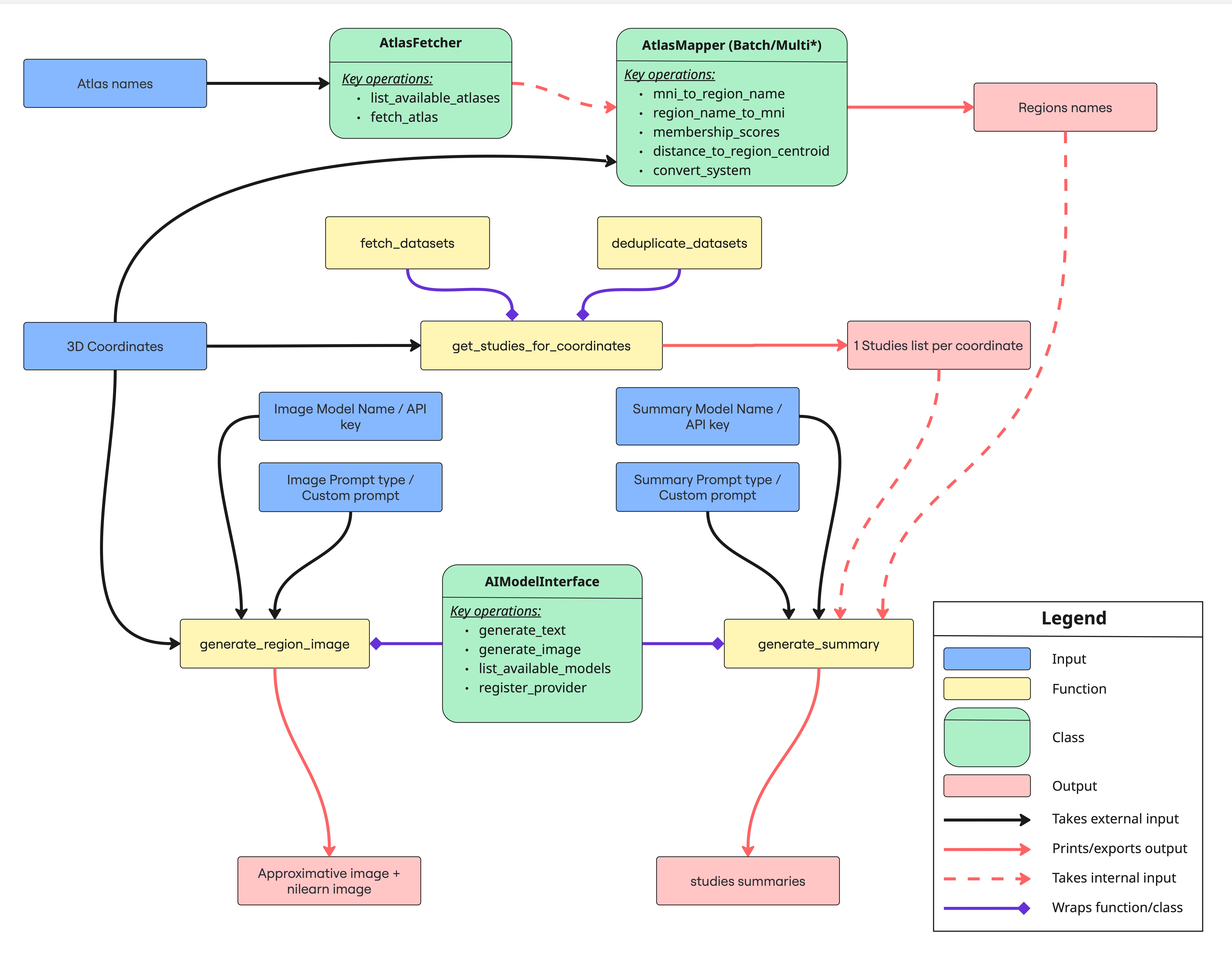
Internal data flow of the Coord2Region pipeline.#
Capabilities#
The pipeline is designed to be multimodal. You can request any combination of the following outputs in a single call:
`region_labels` – Map MNI/Talairach coordinates to atlas region names.
`raw_studies` – Query Neurosynth/NeuroQuery for studies near the coordinate.
`summaries` – Send the retrieved studies to an LLM to generate a semantic summary.
`images` – Generate a statistical map (Nilearn) or illustrative art (AI) for the location.
Python API Usage#
For advanced use cases, import the pipeline directly. This allows you to process dataframes or lists of coordinates within your existing Python scripts.
Basic Execution
from coord2region.pipeline import run_pipeline

# Run the full pipeline on a single coordinate
results = run_pipeline(
    inputs=[[30, -22, 50]],
    input_type="coords",
    outputs=["region_labels", "summaries", "images"],
    output_format="pdf",
    output_name="amygdala_analysis",
    config={"use_cached_dataset": True, "image_backend": "nilearn"},
)

# Access results programmatically
result = results[0]
print(f"Summary: {result.summary}")
print(f"Image saved at: {result.image_path}")
Handling Batch Inputs
The pipeline is optimized for lists. You can pass hundreds of coordinates at once.
# Batch processing
coords = [[30, -22, 50], [-45, 10, 20], [0, -15, 10]]

results = run_pipeline(
    inputs=coords,
    input_type="coords",
    outputs=["region_labels"],  # fast lookup only
    output_format="csv",  # export table
    output_name="batch_results",
)
Error Handling#
The pipeline is designed to be fault-tolerant during batch processing.
Each coord2region.pipeline.PipelineResult object contains a warnings list.
If a specific region cannot be mapped, or if an AI provider times out, the
pipeline records the warning and moves to the next item instead of crashing the
entire batch.
Configuration Schema#
The config dictionary passed to run_pipeline accepts the same keys as the
YAML configuration file.
Key |
Description |
|---|---|
|
List of atlases to query (e.g., |
|
Literature databases (e.g., |
|
|
|
Path to store outputs (defaults to |
Command Line Interface#
While run_pipeline is the internal engine, most users interact with it via
the CLI. See CLI Tools for the complete command reference.